
So you've just bought a Linux-based server through TurboNode? It's time to learn all about Linux and become a champion of the operating system.
What is Linux?
Just like other operating systems like Windows or MacOS, Linux is another operating system. It's one of the most popular operating systems in the world as systems like Andriod also run Linux. It's used in the 500 largest supercomputers in the world and has many distributions, the most popular being Ubuntu followed by Debian. Unlike Windows, most Linux Distributions are terminal based and don't have a visual desktop unless that specific version is installed.
What's a Linux Distribution?
Linux can come in many forms and versions, some are differentiated by visual design, backend changes, or compatibility. These are referred to as a Distribution or "Distro".
Although TurboNode doesn't offer base Linux we offer many Distributions and are always open to add more on request. Some of our current options include:
- AlmaLinux
- CentOS
- Debian
- Ubuntu
First Login
Just like how we'd use Remote Desktop for Windows we also need to use a program to access a Linux server. These are the programs we recommend.
- For the terminal and command line we recommend Termius and;
- For the ability to seamlessly browse files we recommend WinSCP
Login via Command Line
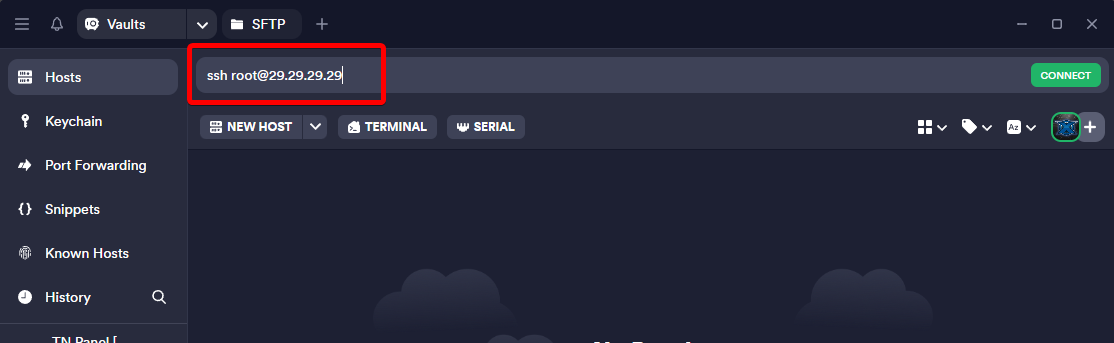
With Termius the "Access" command from the TurboNode Panel can be used to connect to the server.
Login via WinSCP (Remote File Explorer)
To log in with WinSCP simply click "New Site" and fill out the details required
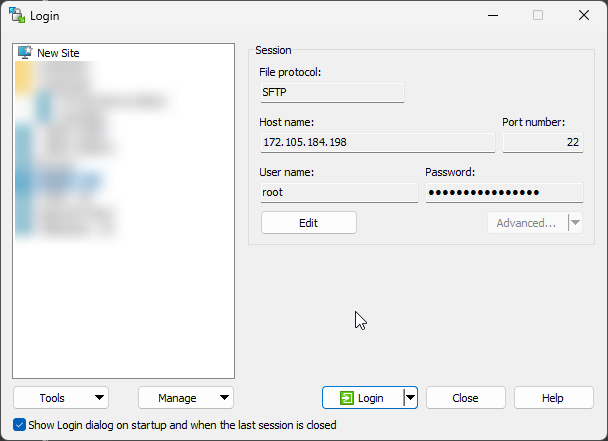
You can also optionally save the login details when you save the site.