Is your Windows server randomly shutting down or restarting? This might be due to your server evaluation license expiring causing this random activity. This may cause Windows to shut down or restart every couple of hours and is likely to start occurring 180 days after ordering your server.
Why Does This Happen?
To comply with Microsoft's guidelines TurboNode doesn't ship Windows Servers with a license which makes the server an 'Evaluation Copy' of the Windows Server which technically only is valid for 180 days from the first boot (or from the date of order).
When the evaluation expires the Windows Server will start being inconvenient for use by randomly restarting or shutting down the server as a form of protest to have a license applied to it. This can be fixed in a couple of ways.
From 20th September 2024 our Windows Servers come with this script pre-installed on your system. This means you shouldn't have to do anything to renew your license.
How to Resolve
There are two ways that can resolve the evaluation expiry on a Windows Server.
- Buy a version of Windows Server 2022 Standard from Microsoft here
- Going through Microsoft may only offer bulk buying licenses in some regions. So other places include cjs-cdkeys.com or g2a.com. Take note these come with the risks of being third party.
- Run the below command in the command prompt to reissue the evaluation copy
slmgr -rearm
This command will get you another 180 days for a total of 3 years of evaluation. After the three years you'll have to obtain a license from the above resources or reinstall Windows and start the 3 years of evaluation again.
Create Windows Task
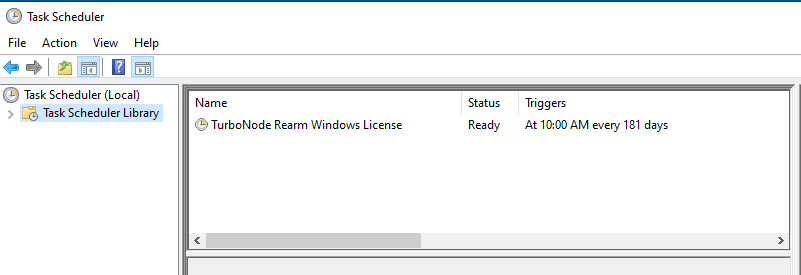
Off the back of step three above, a task can be created to automatically run the command when needed by using Task Scheduler.
- Open command prompt
- Run the below commands in Powershell to download the scripts and set the schedule.
- Only run these commands when the server is first built or, when the license needs to be reissued as the schedule needs to operate on time
curl -o "C:UsersAdministratorRearm Windows License.bat" https://iso-cdn.turbonode.co/windows/rearm.bat
curl -o "C:UsersAdministratorRearm Windows License Dialog.vbs" https://iso-cdn.turbonode.co/windows/rearmdialog.vbs
schtasks /create /tn "TurboNode Rearm Windows License" /tr "C:UsersAdministratorRearm Windows License.bat" /sc daily /mo 181 /st 10:00
Once complete a created task is created in Task Scheduler.